


HHAeXchange
4.14.38K Reviews
App Specs
- Version
- 26.07.01
- Updated On
- License
- Free
- Downloads
- 500,000+
- Developer
- Homecare Software Solutions LLC
- Categories
- Business
- Platform
- Android, iOS
Screenshots

 Analysis by AppCompare
When a home-care worker is moving between visits, a phone can become the link between a planned schedule and the work happening in someone’s home. That makes connectivity a practical part of using HHAeXchange, not just a technical detail. I’d treat it as a work tool for people whose agencies already rely on the service, rather than a general organizer that any household or independent caregiver can pick up and use on its own.
Where a reliable connection matters most
Tasks such as checking visit information, coordinating with a team, and recording attendance are most useful when the app can communicate with the service behind it. In a home-care shift, those moments can happen at a client’s door, between appointments, or while plans are changing. I would make a habit of checking the next visit and any relevant instructions before leaving a place with dependable reception, rather than waiting until I am standing outside the next home.
That small routine is especially useful when a day includes several addresses. A worker can review the sequence of visits before setting off, then use the phone for the specific work task at hand instead of trying to sort out the whole day in a hurry. It also gives the office a better chance to resolve a schedule question before a late arrival turns into a larger coordination problem.
Built for work on the move
Mobile access makes most sense for caregivers who spend much of their working day away from a desk. A phone is easier to carry from one visit to another than a paper folder or a laptop, and a single work-focused app can reduce the temptation to rely on scattered notes. That convenience comes with a trade-off: a small screen is fine for quick checks, but detailed reading or correcting several records may be more comfortable on a larger device or through the agency’s usual office workflow.
For example, a caregiver might start the morning by confirming the day’s visits, check the relevant care information before entering a home, and record attendance as part of the visit routine. If a family member asks a question that needs an office decision, the caregiver can use the established communication channel rather than making an informal promise on the spot. The phone supports the workflow, but it does not replace professional judgment or agency procedures.
What to do when the app or network gets in the way
Any mobile workflow can be interrupted by a weak signal, a slow response, a depleted battery, or an account issue. I would avoid repeatedly tapping a control when the screen appears stuck; first check whether the phone has a usable connection, then reopen the relevant screen and confirm what was actually recorded before trying again. That simple pause can prevent duplicate entries or confusion about whether a visit action went through.
It is also sensible to know whom to contact at work if access fails during a shift. The agency’s normal process should take priority over improvising with personal messages or keeping sensitive details in an unapproved notes app. If a record must be completed later under workplace policy, note only what the procedure permits and follow up as soon as access is restored. The important point is not to assume that a mobile app has saved something until you can see that the task is complete.
Worth Reading Before You Choose

EA SPORTS FC Mobile 26 Is a Bigger Football Game, but It Takes Time

Flipboard Shows What News Apps Must Do Beyond the Feed

Switching to Android Auto Means Rethinking Your Driving Routine

Google Calendar Makes a Crowded Week Easier to Manage

Ludo King Makes the Most of the Minutes Between Plans

Baby Panda World Brings Quick Play to Modern Phones, but Its Game Library Feels Busy
Use mobile data deliberately
For staff who rely on a limited data plan, it is worth paying attention to when the app is being used and keeping other high-data activity separate from work tasks. Routine checks and brief coordination are different from streaming or large downloads, but actual data use can vary with the device, connection, and how the organization has configured its service. I would not change phone settings that affect work access without checking with the agency first.
Privacy deserves the same practical care. A work phone should be secured with the device’s available protections, and patient information should stay within approved systems rather than being copied into personal chats, screenshots, or a general-purpose calendar. This is a sensible habit for any care app, and especially important when a device is carried from one home to the next.
Getting Started with HHAeXchange
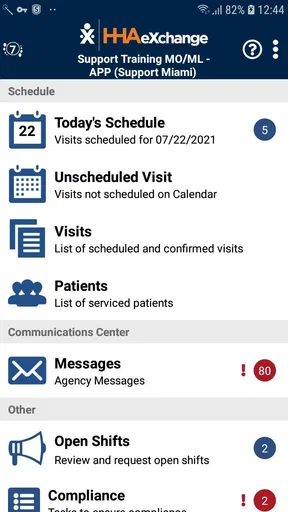
First off, downloading HHAeXchange on your Android or iOS device is a breeze. The app is available on both platforms, and installation is super quick. Upon opening it for the first time, you're greeted with a clean, intuitive interface that doesn’t overwhelm you with too many options. I was pleasantly surprised at how user-friendly it is!
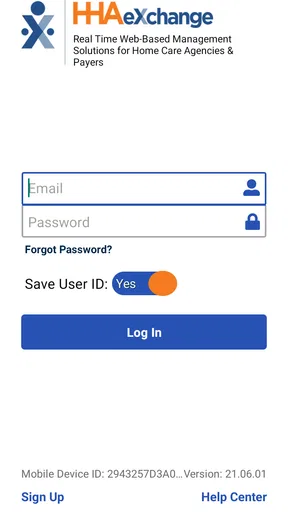
Setting up your account is straightforward. You’ll need to enter some basic information, but the app guides you through each step, making the process smooth. Once you're in, the dashboard becomes your command center. Everything is laid out clearly, making it easy to navigate through different features.
Features that Stand Out
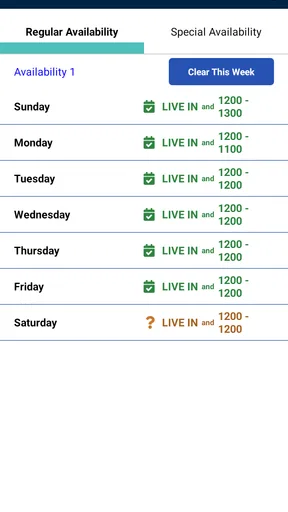
One of the features I immediately loved is the scheduling tool. It’s incredibly flexible, allowing you to manage appointments and visits with just a few taps. You can view your schedule by day, week, or month, which is super handy. Plus, the app sends reminders, so there’s no chance of missing an appointment. Trust me, it's a game-changer!
Another cool feature is the patient management system. You can store and access all your patient details in one place. This includes medical history, care plans, and even past appointments. It’s like having a digital filing cabinet that you can carry around with you. And for someone as forgetful as me, this is a lifesaver!
Compliance Made Easy
Compliance is a big deal in home healthcare, and HHAeXchange has got you covered. The app helps you maintain compliance with regulations by keeping track of documentation and ensuring all necessary forms are filled out. It even alerts you when something needs updating. No more last-minute scrambles to get everything in order!
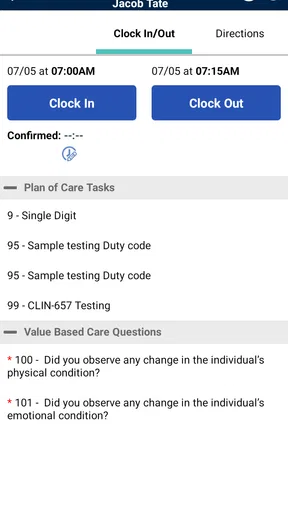
The app also includes a time and attendance feature, which allows caregivers to clock in and out directly from their phones. This not only simplifies payroll but also ensures that all visits are accurately recorded. You can even use GPS to verify visit locations, which adds an extra layer of accountability.
Communication is Key
Communication is crucial in any healthcare setting, and HHAeXchange understands this. The app includes a messaging feature that allows you to communicate with your team in real-time. Whether you need to send a quick update or ask a question, this feature ensures you're always connected. Plus, it keeps a record of all communications, so you can refer back to them if needed.
The app also allows for family and patient engagement. Family members can access certain parts of the app to stay updated on their loved one's care, which is particularly useful for those who can't be there in person. It's a great way to foster transparency and build trust.
Who will get the most from it
HHAeXchange is most relevant to caregivers and home-care teams whose work is already organized through the platform. For them, having schedules, patient information, attendance, and communication close at hand can reduce the need to switch between paper records and unrelated tools. The app is free, is rated for Everyone, and is developed by Homecare Software Solutions LLC. It has an average rating of 4.1 from around 11,000 ratings, with more than 500,000 installs, which suggests it is used by a substantial audience without making it the right fit for every care setting.
If you are an independent caregiver looking for a simple personal calendar, this is probably more system than you need. A normal calendar or notes app may be easier if you only need reminders and do not work with an agency using HHAeXchange. Likewise, families seeking a standalone care-planning tool should first check whether their provider actually uses the service; access to an app does not automatically mean every family member can see every part of a loved one’s record.
How it compares with paper and general-purpose tools
Compared with a paper diary, the main appeal is having work information and visit-related actions together on a phone, rather than carrying separate documents and trying to keep them in sync. Compared with a general calendar, it is more closely tied to home-care administration, including attendance and compliance tasks. That specialization is useful when the agency’s process fits the app, but it also means it is not as flexible as choosing any calendar, messaging service, or spreadsheet you prefer.
A useful trade-off to consider is where the authoritative record lives. If an agency expects staff to use the app, copying the same details into personal tools can create mismatches and expose private information unnecessarily. I would use general-purpose tools only for non-sensitive personal reminders, and keep official care records and work coordination in the channels the employer approves.
Small habits that prevent avoidable snags
Before a busy day, I would check the schedule early enough to flag a conflict while there is still time to ask the office for clarification. During a visit, it helps to treat attendance recording as part of the routine rather than something to reconstruct at the end of the shift. If a location check or a form does not behave as expected, verify the status before moving on, and follow the agency’s process instead of assuming the phone has completed the task in the background.
These habits matter because mobile convenience can encourage people to rush. A quick glance is not a substitute for reading the care information relevant to a visit, and a reminder is not a guarantee that every change has been noticed. I’d use notifications as prompts, then confirm the actual schedule when the day changes or an office update comes through.
Practical questions before relying on it
Do you need an agency account? In practice, this is best approached as a platform your home-care organization uses, not as a self-contained service that an individual can configure for any client. Ask your employer or care provider how staff access is arranged and what the organization expects you to do in the app. That conversation also clarifies which communication and record-keeping steps belong in the mobile workflow.
Will it work in every home or neighborhood? I would plan for connectivity to vary, especially when traveling between locations or entering buildings with poor reception. Check important details ahead of time where possible, and learn the approved fallback procedure for recording work if the connection or app is unavailable. Do not assume that information is stored for later use unless your agency has explained that workflow.
Is it suitable for every phone? The current version is 26.02.02, and the Android minimum listed for the app is version 6.0. Since workplace devices and operating systems can differ, staff should check their organization’s device requirements before relying on a personal phone for a shift. The app was released on May 26, 2014, and has continued to receive version updates, but an older device may still make everyday tasks less comfortable or dependable.
Final Thoughts
Overall, my experience with HHAeXchange has been overwhelmingly positive. It’s not just an app; it’s a comprehensive solution for managing home healthcare services. From scheduling and compliance to communication and patient management, it covers all the bases. It’s evident that a lot of thought has gone into making this app as useful and user-friendly as possible.
If you're in the home healthcare industry, I highly recommend giving HHAeXchange a try. It could save you time, reduce stress, and help you provide better care. And let’s be honest, who couldn’t use a bit of that in their lives?
My connectivity verdict
For a caregiver whose organization already uses the system, mobile access can be genuinely useful when it is treated as one part of a larger work process. The strongest fit is a connected day of visits where staff need to check schedules, handle attendance, and communicate with the team without returning to a desk for every small task.
I would be more cautious if my work regularly took me through areas with unreliable service, if I needed a tool that operated independently of an agency, or if my phone was too old or awkward for frequent record checks. In those cases, a paper backup or the organization’s established office process may be a better companion. My practical recommendation is to confirm access and fallback steps with the employer, keep patient information inside approved channels, and use the app as a focused work tool rather than expecting it to solve every coordination problem by itself.
Pros
- User-friendly interface with intuitive navigation.
- Real-time updates for caregivers and clients.
- Secure data management ensures privacy.
- Customizable features to fit agency needs.
- Efficient scheduling and time tracking tools.
Cons
- Limited offline functionality can be restrictive.
- Occasional syncing issues with server.
- Requires frequent updates for optimal performance.
- Some features may be overwhelming for new users.
- Support response times can vary.
FAQs for HHAeXchange
What is HHAeXchange used for?
HHAeXchange is a comprehensive platform designed to streamline operations for home healthcare providers. It offers tools for scheduling, billing, compliance, and communication between caregivers and agencies. By centralizing these functions, it helps improve efficiency, ensure regulatory compliance, and enhance the quality of patient care.
Is HHAeXchange available on both Android and iOS?
Yes, HHAeXchange is available for both Android and iOS devices. Users can download the app from the Google Play Store for Android and the Apple App Store for iOS. This cross-platform availability ensures that caregivers and agency staff can access necessary information and tools on their preferred devices.
How does HHAeXchange ensure data security?
HHAeXchange prioritizes data security by implementing robust encryption protocols and secure data storage solutions. The platform complies with HIPAA regulations, ensuring that patient information is protected. Regular security updates and audits further enhance its commitment to safeguarding sensitive data from unauthorized access.
Can caregivers use HHAeXchange to track their schedules?
Yes, caregivers can use HHAeXchange to view and manage their schedules in real-time. The app provides updates on shifts, client details, and any changes to assignments. This feature helps caregivers stay organized, reduces scheduling conflicts, and ensures they are informed about their daily tasks.
What support options are available for HHAeXchange users?
HHAeXchange offers various support options, including a comprehensive help center, user guides, and tutorial videos. Users can also reach out to customer support through email or phone. These resources ensure that both new and experienced users can effectively navigate the platform and resolve any issues they encounter.


